

Feeling Stuck Finding Clients?
Let’s be real for a second.
You’ve set up your agency or freelance service, built a website, posted on social media, maybe even tried running some ads but the clients just aren’t coming in. Or maybe you get inquiries that go nowhere.
You start thinking, “Maybe my pricing is the problem,” or “Maybe people just aren’t interested in these services anymore.”
But in reality? It’s not about your skills or services.
It’s about your outreach process.
And one of the most underrated, free, and insanely effective tools for client outreach is… Google Maps.
Yes, Google Maps. The same one we use to find biryani spots or gyms can also help you find ideal local business clients, clients who actually need your help.
Let us walk you through the exact process we use at our own agency the same method that helped us go from chasing clients to choosing which ones to onboard.
Note: Want to build your carrier in this digital world, join our training programs to learn directly from industry experts.
Outreach Process
Step 1: Find the Right Businesses (Without Guessing)
Forget running random Facebook ads or cold emailing random companies. Instead, open Google Maps and search for businesses by category and city, like:
- “Dentists in Lahore”
- “Restaurants near DHA Karachi”
- “Real Estate Agents in Islamabad”
- “Gyms, car showrooms, salons, cafes…” You name it.
The businesses that show up here are already active, listed, and interested in being found that means they likely have some digital presence (even if it’s weak), and you can help them grow.

Step 2: Collect the Business Data (Fast & Easy)
Okay, you found a bunch of businesses. But don’t start messaging them one by one. That’s a waste of time.
Instead, install a free Chrome extension called Instant Data Scraper. It pulls the business name, phone number, website, etc., right from Google Maps listings and exports them into Excel. Boom now you’ve got a ready-to-work outreach sheet.
This step alone saves hours and gives you a powerful lead list.
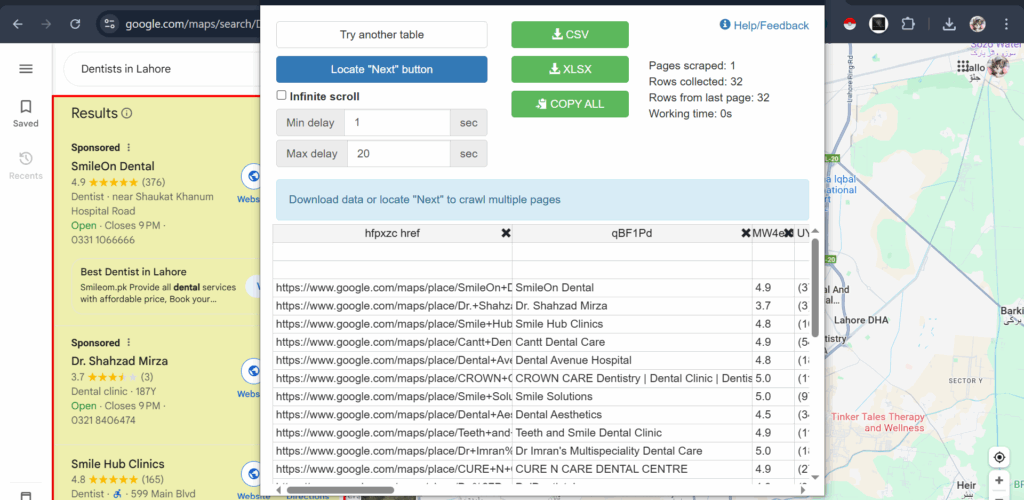
Step 3: Analyze the Businesses Before Reaching Out
This is where most people go wrong they just copy-paste the same message to every business.
Please don’t do that. We’re professionals, right?
Spend just 3–5 minutes analyzing each business:
- Are they running Facebook/Google Ads?
- Does their website have a Meta Pixel (means they might be advertising)?
- Is their Google My Business profile complete?
- Are they posting actively on social media?
This small research shows that you care and aren’t just throwing pitches around blindly. It also gives you real talking points to use in your message.
Step 4: Send a Smart, Personalized Message
Now it’s time to reach out but keep it human.
Here’s what a good outreach message looks like:
- It starts with a compliment (shows you noticed their business).
- It highlights one area they could improve.
- It offers a real solution no fluff.
- It ends with an easy next step (e.g., a free audit call).
Example:
“Hi, we came across [Business Name] and love what you’re doing! We noticed your site isn’t fully optimized for Google Maps searches your competitors are running ads and appearing ahead. We’d love to show you a quick, free fix for this. Interested?”
Bonus tip: Use WhatsApp if their number is available. It’s faster, more personal, and usually gets a quicker response than email.
Step 5: Give an Irresistible Offer
Once they reply with interest, this is your chance to hook them in.
Don’t just say, “We do SEO or ads.” That’s generic.
Instead, say:
- “Here’s a quick case study of how we helped a similar business grow leads by 3X.”
- “Let me offer a free local SEO audit to show where you stand.”
- “I’ve helped other salons in your area grow their IG presence and bring in real bookings.”
Make it about value and results, not just services.
Step 6: Follow Up Like A Pro (Most People Don’t)
Didn’t hear back? That doesn’t mean they’re not interested.
They’re just busy or maybe they forgot. That’s why a friendly follow-up system is gold.
Here’s our proven follow-up sequence:
- Day 1: Send initial message
- Day 3: Short reminder (“Just wanted to check if you saw my message.”)
- Day 7: Value-based follow-up (“I noticed this on your website that might be hurting leads…”)
- Day 14: Final ping (“Still open to growing your business with a digital boost?”)
Follow-ups convert. Period. Don’t skip them.
Step 7: Scale This Process Like a Business
Once you’ve done this for a few clients and gotten results, now you scale.
- Hire a VA to help with scraping or research
- Create a message template that still feels personal
- Use a CRM or simple sheet to track follow-ups and conversions
- Build small case studies to use in your pitches
This isn’t about just “reaching out” this is prospecting with purpose, and it works.
Final Thoughts: Google Maps Is More Than a Map: It’s a Client Goldmine
You don’t need big ad budgets. You don’t need complicated funnels. You just need a process and consistency.
With Google Maps, you’re literally seeing who’s already running a business, and you get the chance to say:
“Hey, I noticed this I can help fix it.”
And once you help a few, they talk. That’s how client trust builds. That’s how referrals start. That’s how agencies grow.
We’ve done it ourselves, and now our outreach funnel is one of our strongest pipelines for local and international clients.
Need help building or managing your outreach process?
We’ve built results-driven outreach systems for marketers, freelancers, and agencies that actually convert. Let’s talk strategy for your business no pressure, just value. Want to master this process or offer it as a service? Join our Digital Marketing Program or explore our Agency Services both based on what you just read above.